Bedrock AgentCore in Production: Where Your MCP Tools Should Actually Live
Most of what breaks when an AI agent goes to production has nothing to do with the model. It’s where your tools run, how your agent authenticates to them, and where your knowledge base lives once it stops being a notebook and starts being infrastructure.
Amazon Bedrock AgentCore went generally available in October 2025, and by mid-2026 it has grown into the closest thing AWS has to an opinionated answer for “how do I run agents in production.” We’ve now deployed it across several client engagements (retail conversational platforms, HR analytics agents, logistics workloads), and the same three architectural decisions come up every time: where AgentCore fits relative to the rest of your stack, whether your Model Context Protocol (MCP) tools belong on Lambda or on ECS Fargate, and whether your knowledge base should be a vector store you own or one AWS manages for you. This post works through all three, with a reference architecture you can start from.
What AgentCore actually is
AgentCore isn’t a single service. It’s five components that compose:
1- Runtime hosts your agent code in an isolated microVM per session, with execution windows up to eight hours and support for the Agent-to-Agent (A2A) protocol for multi-agent handoffs. It’s framework-agnostic (LangGraph, CrewAI, LlamaIndex, Google ADK, and the OpenAI Agents SDK all deploy the same way) and model-agnostic, so a Claude-on-Bedrock agent and a GPT-based agent run on identical infrastructure. Our own agents are built on Strands, AWS’s open source agent SDK, which pairs naturally with Runtime and Gateway since all three come out of the same ecosystem.
2- Gateway is the piece that actually changes how you build tools. Point it at an OpenAPI spec, a Smithy model, or a Lambda function, and Gateway wraps it as an MCP-compatible tool with zero custom server code: it handles inbound OAuth, outbound IAM or API-key auth, and semantic tool discovery so an agent with 200 available tools doesn’t have to reason over all 200 at once. It also proxies genuinely stateful MCP behavior now (sessions, response streaming, elicitation, server-initiated sampling), so a Gateway-fronted tool isn’t limited to simple request/response.
3- Identity issues scoped, short-lived credentials per agent session rather than one static role, and as of mid-2026 supports on-behalf-of token exchange so an agent can act as a specific authenticated user against downstream systems without juggling multiple consent flows.
4- Memory and Observability round it out: self-managed or built-in memory strategies for session and long-term context, and CloudWatch-based tracing that’s OTEL-compatible with Datadog, Dynatrace, Langfuse, and similar tools.
There’s also a higher-level path worth knowing about: Harness, which reached general availability in mid-2026, wraps Runtime, Memory, Identity, and Observability behind three API calls: create, update, and invoke a fully managed agent, with built-in memory and an AWS skills catalog out of the box, plus an export path to plain Strands code once you’re ready to take it apart. It’s a legitimate way to get a working agent in front of stakeholders fast. We don’t build production engagements on it, though: once you need a specific VPC topology, custom IAM boundaries, or a system the client’s own team can fully own and operate after handover, composing Runtime, Gateway, Identity, and Memory yourself gives you control a managed wrapper doesn’t. Where Harness earns its place is the prototype: validate the agent behavior first, export to Strands, then build the production version on the primitives above.
Decision 1: Lambda or ECS for your MCP tools
Gateway will happily turn a Lambda function into an MCP tool for you, which makes Lambda the default reflex. It’s the right default for a specific shape of workload: short executions, bursty and unpredictable traffic, no need to hold state between calls. A pricing calculator, a single-record lookup, a formatting or validation step: Lambda behind Gateway, done.
The moment a tool needs to hold a connection open, keep a warm cache, run a dependency-heavy runtime, or sit inside a VPC talking directly to a private data store, Lambda starts fighting you. That’s where you register an MCP server running on ECS Fargate as a Gateway target instead. AWS’s own reference pattern here is a three-tier layout: a public-facing UI service behind an ALB, an agent service running your orchestration framework in a private subnet, and the MCP server itself (commonly built with FastMCP) exposed over Streamable HTTP, also private, discovered via ECS Service Connect. Only the UI tier is internet-routable; everything else stays inside the VPC, which matters a lot once compliance and data-residency requirements enter the conversation.
A rough rule that’s held up across our engagements:
| Signal | Lambda | ECS Fargate |
|---|---|---|
| Traffic pattern | Bursty, spiky, idle most of the time | Steady, sustained concurrency |
| State | Stateless, one-shot | Long-lived connections, warm caches, multi-step sessions |
| Dependencies | Thin, pure-Python/Node | Native libraries, heavy ML/processing stacks |
| Network | Public API, simple IAM | VPC-resident, private data stores, fine-grained connection control |
| Gateway integration | Native, zero-config wrapping | Registered as an MCP target; you own the server |
Most production agents end up with both: Lambda for the long tail of small, cheap tools, ECS for the two or three tools that are actually doing heavy lifting. Don’t force one model on the whole toolset.
That split usually happens inside a single feature area, not across them. An action that mutates something (place an order, add to a cart) is one request, one response, gone: Lambda. The process that follows it (reserving inventory, waiting on payment confirmation, tracking fulfillment) holds state across steps and needs a pooled connection to whatever database backs it, since a Lambda opening a fresh connection to RDS on every invocation is how you exhaust a connection limit under load. Same domain, two different shapes of work, two different homes.
Decision 2: Aurora pgvector, or let AgentCore manage the knowledge base
Retrieval-augmented generation is still the backbone of most enterprise agents, and until recently the default pattern was straightforward: Aurora PostgreSQL with the pgvector extension as the vector store, sitting alongside your operational data, queried through a Lambda or ECS tool registered with Gateway. It’s a pattern we’ve shipped repeatedly: Aurora’s appeal is that it’s Postgres, so your embeddings live next to relational data you already understand, inside a VPC you already control, in whatever region your compliance posture demands.
sql
-- Aurora PostgreSQL + pgvector: hybrid retrieval example
SELECT id, content,
       1 - (embedding <=> $1::vector) AS similarity
FROM knowledge_chunks
WHERE tenant_id = $2
ORDER BY embedding <=> $1::vector
LIMIT 8;
That query gets wrapped as an MCP tool, exposed through Gateway, and called by the agent like any other capability: vector search is just another tool call from the model’s point of view.
Managed Knowledge Base, registered as a Gateway target the same way, gives you a choice on how that call behaves: a plain Retrieve for ranked chunks back in one shot, or Agentic Retrieval, where the knowledge base’s own model breaks a complex question into sub-queries and iterates until it’s satisfied. That’s a mode you set on the tool, not a second agent you build and deploy.
What’s changed is that AgentCore’s Managed Knowledge Base reached general availability in mid-2026, and it’s a legitimate alternative rather than a toy. It ships native connectors for S3, SharePoint, Confluence, Google Drive, OneDrive, and a web crawler, handles sync and re-indexing automatically, and runs hybrid search across text, image, audio, and video content without you standing up a pipeline. For a knowledge base that’s genuinely just “index our docs and let the agent search them,” it now removes real operational weight: no schema to design, no re-embedding job to maintain, no index to tune.
The decision boils down to control versus operational load. Reach for self-managed Aurora pgvector when your embeddings need to sit next to relational data you’re already querying, when you need custom hybrid-search logic beyond what the managed connectors expose, or when data residency requires a specific region or network posture your Aurora cluster already satisfies, which for us, on UAE workloads, usually means me-central-1 by default. Reach for Managed Knowledge Base when the source is document-shaped, the connectors already cover it, and every hour not spent on retrieval infrastructure is an hour spent on the agent behavior that actually differentiates the product.
One practical note if you do move an existing pipeline over: there’s no built-in migration path for embeddings already sitting in a self-managed store. Managed Knowledge Base re-ingests your source documents through its own connector and generates its own embeddings: it won’t reuse what’s already in Aurora. Point it at the same source, run it in parallel against real queries until retrieval quality holds up, then retire the old sync pipeline rather than cutting over in one step. And confirm region availability before committing: Managed Knowledge Base launched in a specific set of regions (Virginia, Oregon, Sydney, Tokyo, Dublin, Frankfurt, London, plus GovCloud West), which is worth checking against wherever the workload actually runs.
Putting it together
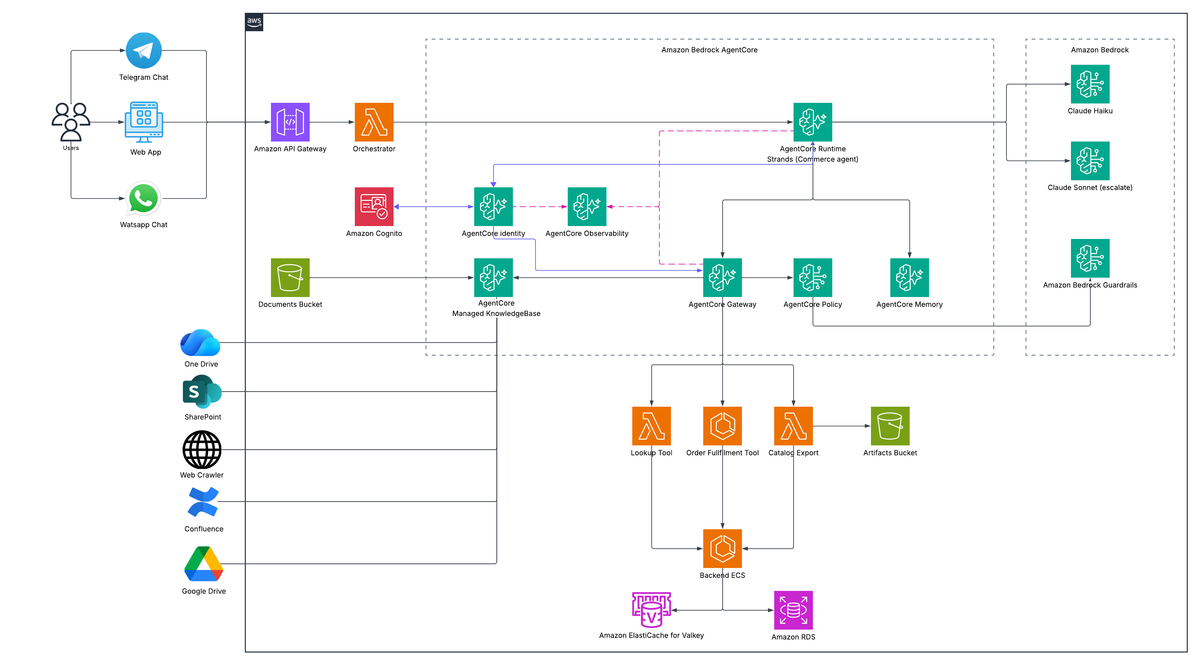
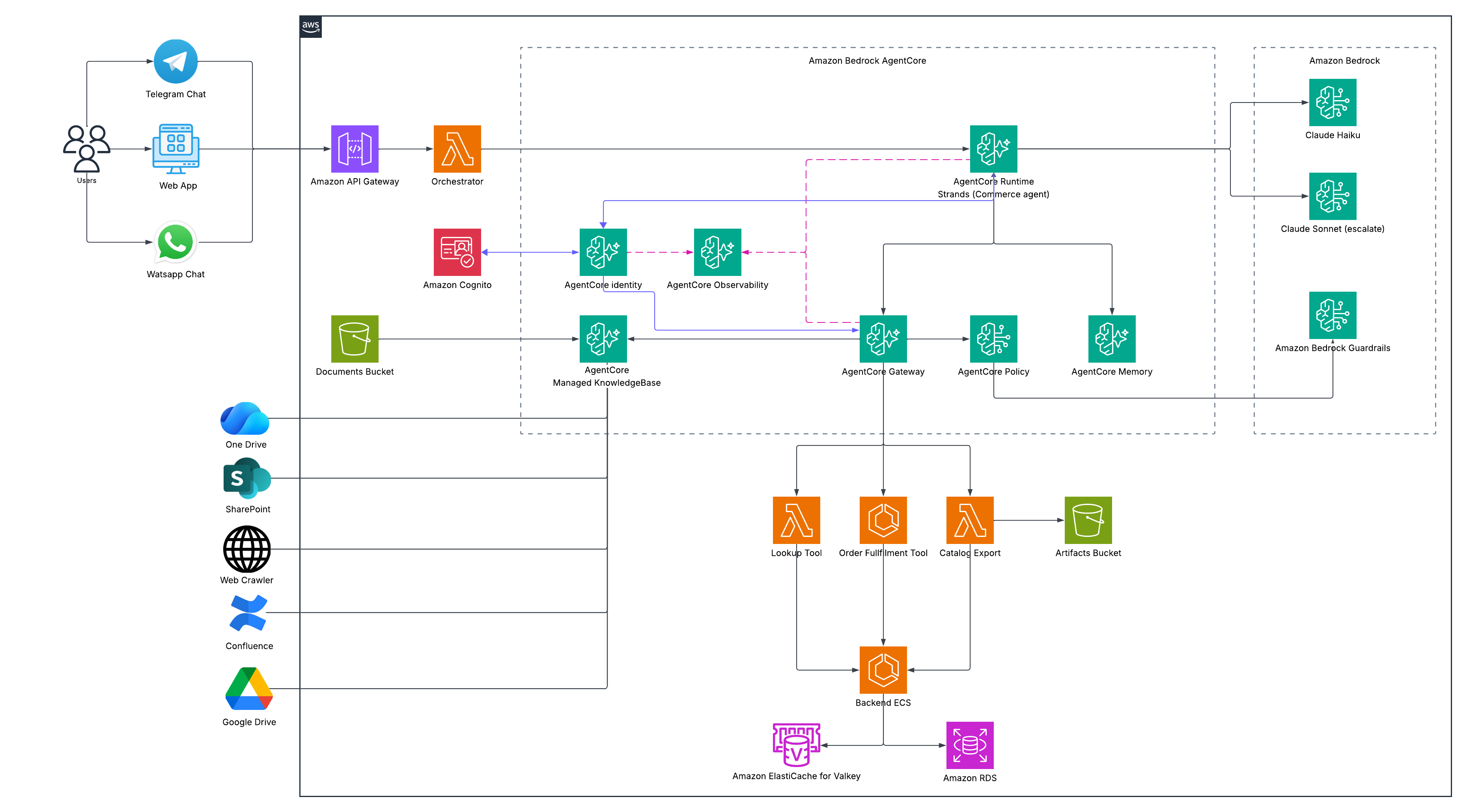
The reference architecture at the top of this post is the shape that holds up across the engagements we’ve run: channels converging through one API Gateway and a thin orchestrator, into AgentCore Runtime, out through Gateway to whichever mix of Lambda and ECS tools and knowledge base you’ve chosen, down to your own backend APIs, with Identity, Policy, and Observability wrapping the whole thing rather than sitting off to the side.
Identity does two separate jobs here, not one. Runtime consults it to validate the caller’s token and get back a workload access token for the session: that’s the primary relationship. Gateway consults it separately, for its own outbound credentials to call Lambda, ECS, and the knowledge base. Policy, which reached GA in March 2026, sits at that same Gateway perimeter and checks every call in and every agent action out, and as of mid-2026 it can hand off to Bedrock Guardrails directly for the actual content and safety evaluation, so Guardrails isn’t just sitting next to the model, it’s wired into the same checkpoint. Observability then gives you one trace across Runtime, Gateway, and every tool call underneath it, which is the difference between debugging an agent and guessing at one.
A few supporting pieces don’t get their own layer in the diagram but matter in practice. Channel adapters for Telegram, WhatsApp, and web typically sit behind one API Gateway and a thin orchestrator Lambda, so AgentCore only ever sees a single normalized request shape regardless of where it came from. The Lambda and ECS tools usually end their chain by calling your own backend APIs (catalog, checkout, loyalty, whatever your business already runs) rather than talking to AWS services directly. Anything else that doesn’t need to happen inside the live agent turn, like a periodic catalog sync against your own backend, runs better asynchronously through EventBridge and Step Functions than bolted onto the request path. The knowledge base’s own ingestion doesn’t need that scaffolding at all: that’s what Managed KB’s native connectors are for. And all of it ships the same way: as Terraform through CI/CD, with CloudWatch alerts landing in Slack/MS Teams, not hand-run infrastructure someone has to remember to check.
Where the real engineering work actually is
None of this is exotic engineering. It’s mostly disciplined use of managed services. The actual work is in the decisions: which tools are cheap enough to be disposable Lambda invocations and which ones need a persistent home on ECS, which knowledge deserves a managed connector and which deserves a schema you control, and where the regional and compliance lines actually sit for the market you’re serving. Get those three decisions right early, and AgentCore does most of the rest for you.